

With Scan Sys NewGen, we are updating ImageCapture in three key areas: AI-powered document recognition, the user interface, and the availability of AI features via the cloud.
In this way, NewGen goes beyond simply introducing a single new feature. It changes how ImageCapture recognizes information from documents, how users interact with the software, and how we develop and offer new capabilities.
During our webinar on October 6, we introduced these three developments. What exactly is changing, and why did we choose to make these changes?
Recognition Agent: Document Recognition with More Context
Document processing begins with recognizing the correct data—from invoice numbers and amounts to item numbers, quantities, prices, and descriptions. This becomes particularly complicated at the line item level. Suppliers use different formats, descriptions, and ways of presenting information.
With Recognition Agent, we’re introducing AI recognition that looks beyond individual text fields or fixed positions on a document. The AI uses the context of the entire document to recognize and interpret data.
Recognize more information, be less dependent on fixed layouts
While traditional recognition often relies on predefined recognition rules or templates, Recognition Agent can also establish connections between data that isn’t directly linked.
Consider a product description that includes additional product information, or a delivery date listed in a different place than the corresponding invoice line item. The AI uses the surrounding information to determine which pieces of data belong together.
As a result, recognition becomes less dependent on how a supplier has structured its documents. This makes it possible to process a wide variety of document formats with less manual setup and fewer corrections.
Spend less time setting up recognition
The time required to set up the recognition system also plays an important role in this regard.
Setting up and optimizing a recognition template for a complex document layout can sometimes take hours. With Recognition Agent, that upfront setup is no longer necessary for every layout. The AI uses the context of the document to recognize data, without requiring all recognition rules to be defined individually in advance.
That doesn’t automatically mean that AI processes every document faster. In fact, existing recognition methods can be very fast for certain documents. The potential time savings therefore also lie in reducing the setup required and the need for manual corrections.
The value goes beyond recognition
Data recognition is a component of document processing. This information also serves as the basis for verifying documents, matching them with purchase orders, and further processing them in the ERP system.
The more complete and reliable the recognized data is, the better these next steps can be supported. The added value of Recognition Agent therefore lies not only in what the AI extracts from a document, but also in what you can do with that information afterward.
More Than Just Invoice Processing
Recognizing various document details also plays an important role in purchase order confirmations, customer orders (sales orders), and packing slips. Examples include item codes, quantities, descriptions, delivery dates, and other information needed for further processing.
With contextual AI recognition, we are therefore laying the groundwork for further automation of various document workflows within ImageCapture. This is not just about extracting more data, but above all about making better use of that information in the subsequent processes.

A redesigned interface: more calm, clarity, and control
In addition to the new look, the ImageCapture user interface is also changing.
In recent years, more and more features have been added to the software. This expansion brings new functionalities, but also requires a redesign of the interface.
For employees who work with ImageCapture on a daily basis, it’s important that the screen remains organized. Which documents require attention? Where do you need to check something? And which actions are relevant at that moment?
That is why we are developing a redesigned user interface within NewGen, with a greater emphasis on a calm, organized experience and intuitive operation.
A new layout with room for further development
The redesigned interface is more than just a visual update. We’re taking a fresh look at how features are displayed and how users navigate the software.
Frequently used actions should remain easily accessible. Less frequently used features can be moved to a different location, such as within a menu. This creates more space on the main screen for the information and actions that are important at that moment.
That space is also needed for the new capabilities we are developing within NewGen. As ImageCapture gains more AI capabilities, the user interface must be able to support them in a clear and organized manner.
The redesigned interface is still under development. The designs shown provide an initial glimpse of the direction we’re heading, and the final layout and functionality may be further adjusted based on user feedback.

Cloud-Based AI: New Possibilities for Existing Systems
The third major development within NewGen isn’t so much about what you see on the screen, but it’s just as crucial to the future development of ImageCapture.
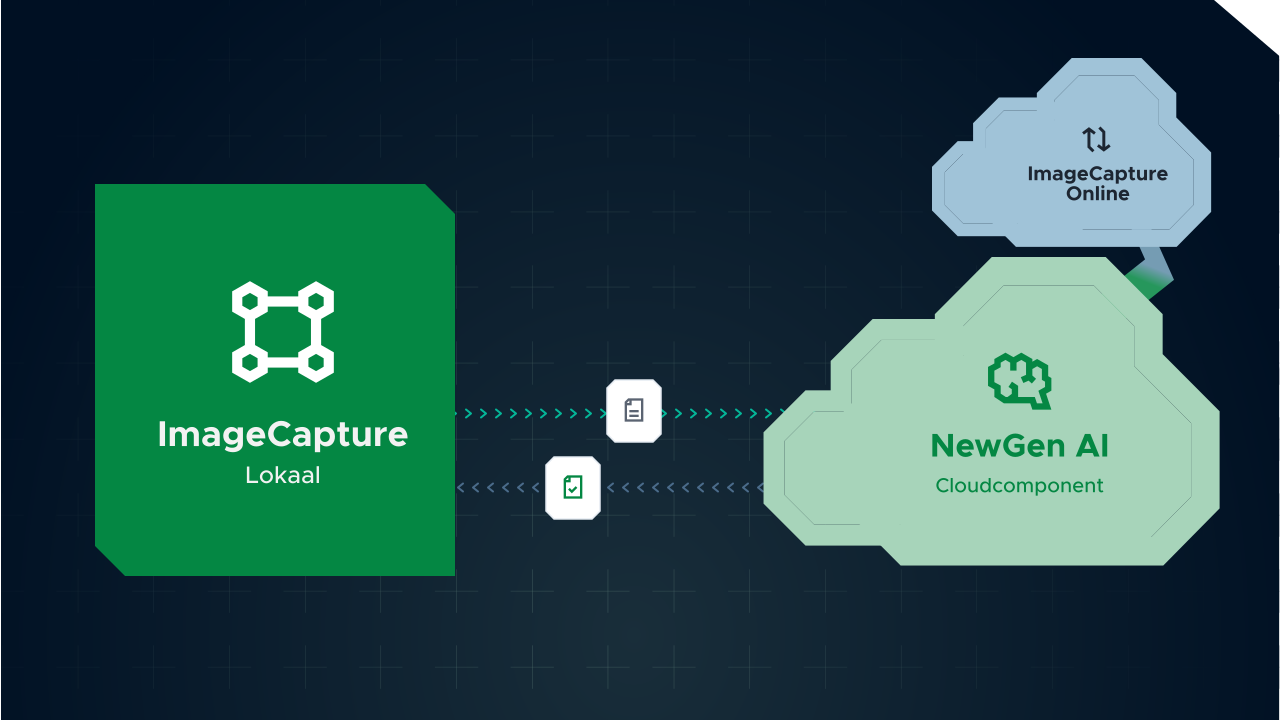
We will be offering new AI features via the cloud. This means that the AI components do not need to run separately within each ImageCapture installation. ImageCapture utilizes these features, while the AI processing takes place via the cloud component.
Even when you use ImageCapture locally
Not every organization uses ImageCapture via the cloud. Many customers use the software locally, within their own IT environment.
With the NewGen platform, these organizations can also take advantage of new AI capabilities without having to make a complete transition to a cloud environment.
With AI recognition, the document is sent from the local ImageCapture environment to the AI component. Recognition takes place there, after which the result is returned to ImageCapture for further processing.
Technically, this is made possible through a software update. For existing customers, however, this does not mean that AI features will automatically become available after an update. To be able to use these features, customers must also switch to the new contract and pricing model.
The additional technical steps required depend, among other things, on the current software version, the ERP integrations in use, and any customizations within the system.
Develop and deliver new AI capabilities more quickly
This approach also offers advantages for the further development of our software. AI technology is evolving rapidly. By offering new AI features through a central cloud component, we can continue to develop and expand them without having to modify the entire local ImageCapture environment each time.
This creates a technical foundation that will allow us to support future AI capabilities within NewGen as well.
The rollout will take place in phases. We will start with a limited group of customers and then gradually expand availability. In doing so, we will take into account the various customer environments, ERP integrations, and technical requirements.
What’s next for NewGen?
The rollout of NewGen is taking place in phases. We are giving priority to customers who are using a current version of ImageCapture. It is therefore advisable to keep your software up to date so that you are technically prepared for the new features. In addition, access to the AI features requires a switch to the new contract and pricing model. A software update alone is therefore not sufficient.
In the upcoming NewGen Deepdive Webinar, we’ll use a comprehensive hands-on simulation to demonstrate what working with AI in ImageCapture will look like—from deploying AI recognition and evaluating results to requesting improvements.
Stay tuned to our LinkedIn page and newsletter. The invitation will be sent out soon! In the meantime, you can watch a replay of our NewGen webinar from October 6.

